Map the audience’s information
Write the scene as a sequence of discoveries. In a fictional kitchen scene, a child hides a broken cup, a parent notices the missing cup and the child chooses to confess. The viewer needs to see the break or its evidence, understand what the parent notices and read the child’s decision.
Assign a possible image to each discovery before choosing camera language. If two boards communicate the same fact, one may be unnecessary. If a crucial change exists only in dialogue, decide whether an action or detail can make it visible.
Establish the relationships between people and objects
Draw a simple overhead plan showing the characters, exits and important objects. Choose a view that makes those relationships understandable. A wide shot earns its place when it explains the room or a changing relationship; it does not need to open every scene by habit.
Keep camera positions consistent enough that a cut does not accidentally swap the characters’ apparent locations. If you want a disorienting transition, plan how the audience will recover their bearings. Small sketches are sufficient at this stage; polished artwork can make uncertain decisions feel prematurely settled.
Give each planned angle a job
Label shots by the information they carry. “Cup fragment under table” is more useful during planning than “beautiful cinematic insert.” Include a reaction when its timing changes how an action is interpreted. Decide whether the viewer should know about the hidden fragment before or after the parent does.
Use this fictional coverage set as a starting point, then remove anything that duplicates an existing beat.
| View | Purpose | Cut motivated by |
|---|---|---|
| Kitchen two-shot | Establish child, parent and table. | Parent enters. |
| Cup fragment detail | Reveal what the child is concealing. | Child glances down. |
| Child reaction | Show the decision to confess. | Parent asks about the missing cup. |
Test the edit before finishing the boards
Place rough boards in the intended order and speak the scene aloud. Check whether every cut reveals, redirects or changes something. A board that works alone may fail in sequence because the action jumps or a prop moves without explanation.
Keep one alternative for a genuinely uncertain beat, such as whether to reveal the fragment early. Compare both sequences with the same question. Once you choose, mark the decision and update the shot list. Keeping every option indefinitely expands production while leaving the editorial problem unresolved.
In the captured Wrong Opera Workbench, Board is selected and the scene list identifies the active shot. Wireframe, Keyframe and Clip are separate views of that shot; framing, camera movement and on-screen duration appear in its details. Review the wireframe first for subject placement and eyeline, then check whether the keyframe preserves that information.
Use Approve or Request changes only after naming what the shot must communicate. “The switch must be visible before the hand enters” is a coverage decision a reviewer can check. Keep the full sequence nearby: approval of every isolated shot does not establish that the transition between them is understandable.
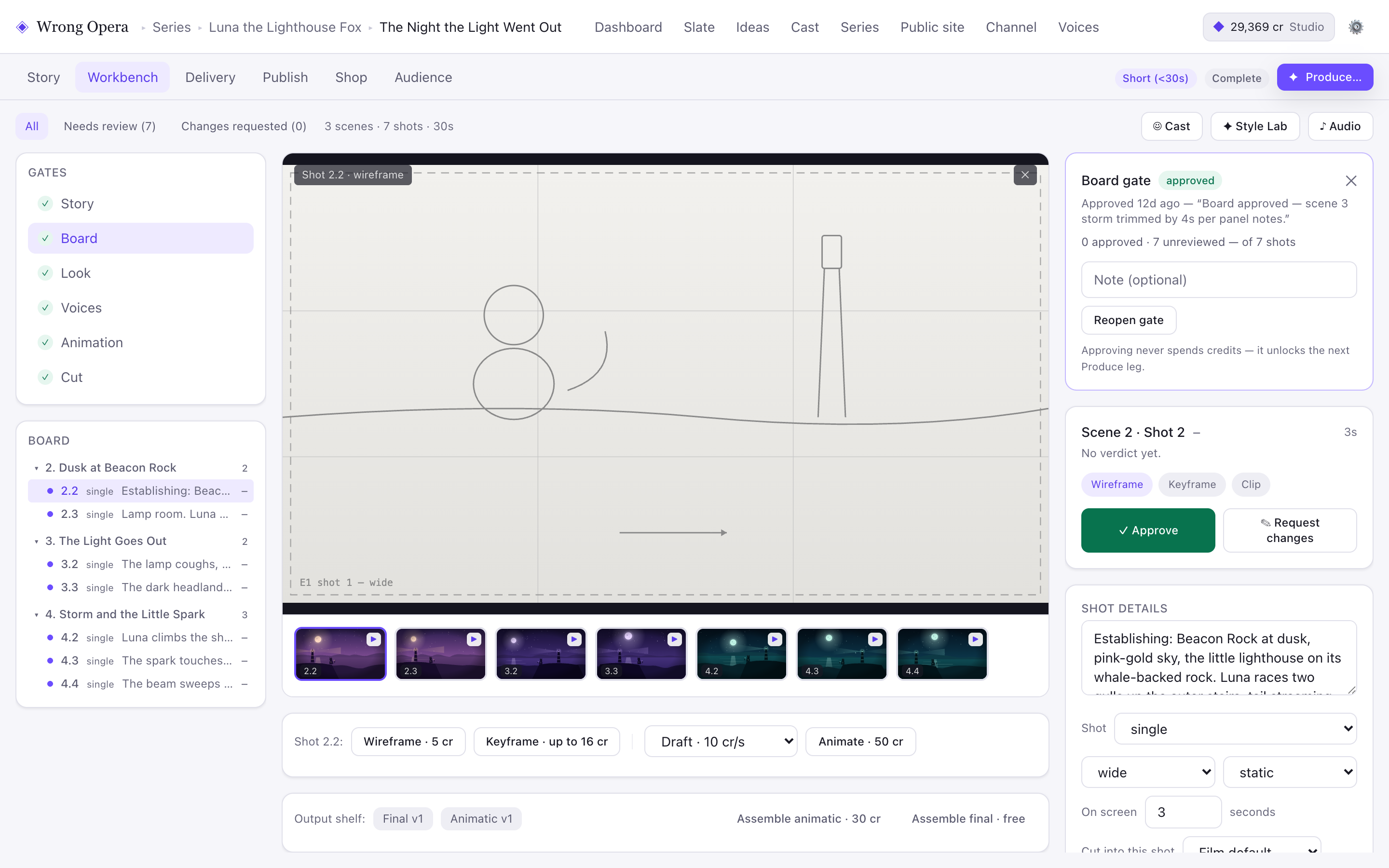
Board view with the selected shot’s wireframe, review controls and shot details. The capture makes the coverage-review task visible before discussing rendered finish.
Real product interface captured 7 September 2026, using fictional built-in demo data. Approval notes and balances are sample data. Any animation or final-cut playback shown uses still-image fixtures, not a measured production result.
Open full-size product screen ↗Questions & answers
Do I need close-ups of every speaker?
No. A shared frame can carry dialogue when body language and relationships matter. Plan a close-up when a particular reaction, detail or change of attention needs emphasis.
What if I discover missing coverage during the edit?
Describe the exact information gap before requesting another shot. A short detail may solve it; rebuilding the entire scene is rarely the first question to investigate.
Explore the workflow with your own idea.