A film becomes manageable when you turn a broad idea into a sequence of clear decisions. Decide whose story it is, what changes and what the viewer needs to see. Wrong Opera connects writing, story development, storyboards, casting, animation, editing and publishing, so you can develop those decisions through a shared production workflow.
This is a production method illustrated with real product UI and fictional sample data. It is not a completed-film case study or a guarantee of generation quality.
1. Give the idea a protagonist and a choice
Write a logline naming a character, a goal and an obstacle. For example: a night-shift cleaner finds a message from tomorrow and must decide whether to interrupt the museum's opening to prevent an accident.
The interesting part is the decision and its consequence. List what the cleaner could lose by acting and by staying silent; those stakes will guide the scenes.
2. Build a treatment around changes
Describe the film in a few paragraphs, including the ending. Mark the moments when new information changes the protagonist's plan. The cleaner discovers the message, tests it, finds a contradiction and makes a choice.
Avoid adding locations or supporting characters simply to make the film feel bigger. Each addition should reveal character, create an obstacle or help the story resolve.
3. Draft scenes with an observable purpose
Give each scene an action viewers can follow. Instead of writing that the cleaner feels suspicious, show them checking the message against a clock or moving an object to test a prediction.
Read the script aloud and identify dialogue that repeats visible information. Simulated audience testing can help surface confusing motivations, but its responses need interpretation and do not represent measured viewer reactions.
4. Storyboard the essential visual information
Create boards for the moments that carry the story: the first message, the test, the apparent failure and the final choice. Establish the museum layout so entrances, exits and eyelines remain understandable.
Review the boards as a sequence. A beautiful close-up contributes little if viewers do not know what the character is looking at or why it matters.
In Wrong Opera’s captured Board view, select a shot from the scene list and inspect its Wireframe, Keyframe and Clip views. The shot details show framing, camera movement and on-screen duration. Use the wireframe to settle where the action happens before judging texture or visual polish. The Approve and Request changes controls let the review decision stay attached to the shot.
For the museum example, plan a wide view locating the cleaner and clock, an insert making the message legible, and a reaction that changes the cleaner’s next action. If a shot does not reveal new information, try removing it from the paper sequence before paying to produce it. A gate approval records a creative decision; it does not prove the generated sequence will cut together successfully.
- Show where each scene takes place.
- Give important objects a clear introduction.
- Keep screen direction understandable between shots.
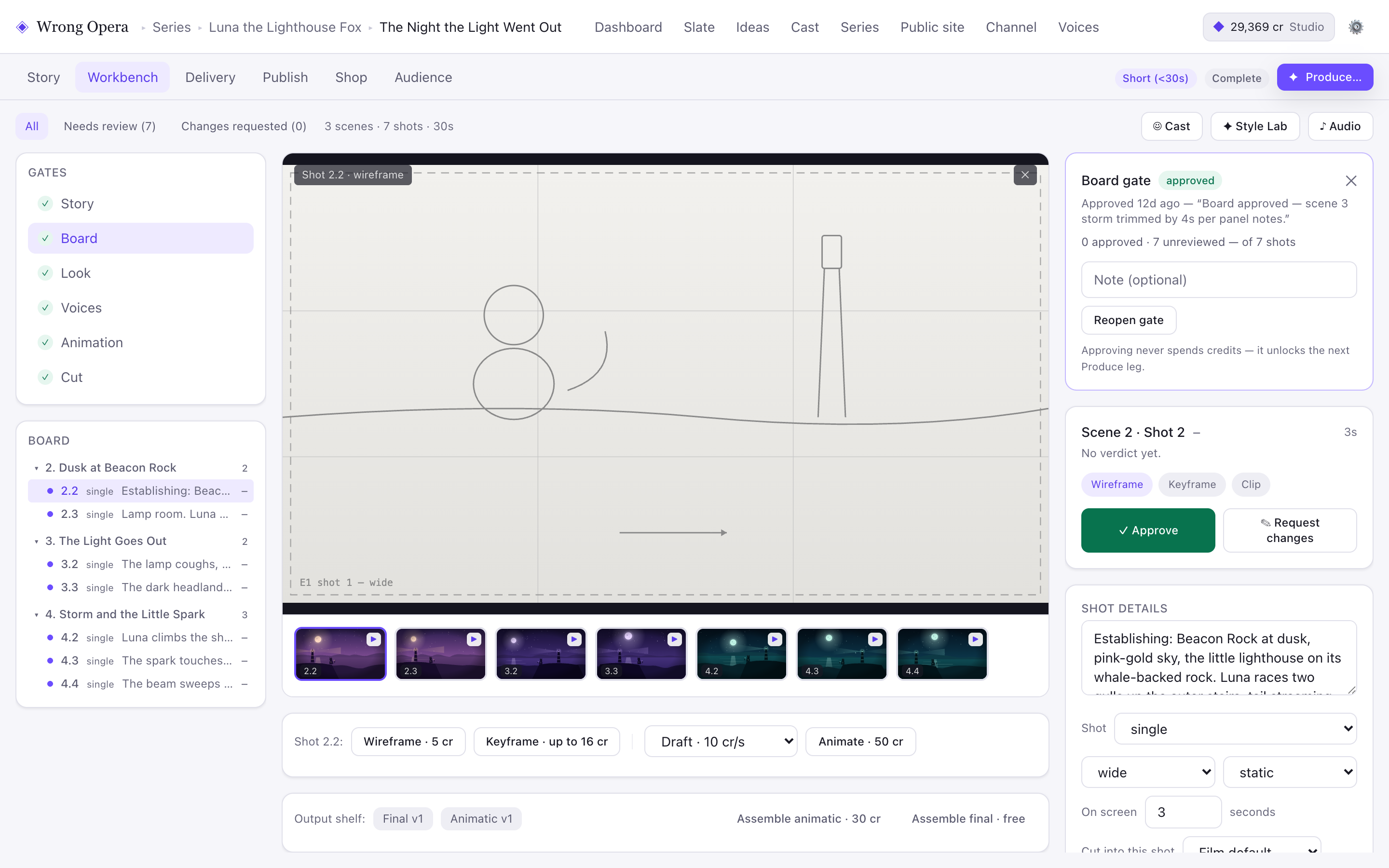
The Board interface exposes shot selection, three representation views and a review decision. Its sample lighthouse scene illustrates the controls, not the museum story described in this guide.
Real product interface captured 7 September 2026, using fictional built-in demo data. Approval notes and balances are sample data. Any animation or final-cut video slot shown holds a still placeholder frame.
Open full-size product screen5. Establish performance before expanding production
Choose character and voice direction that serve the tone. A restrained performance might make the museum story more tense than an exaggerated one. Produce a representative scene and review it before carrying those choices across the film.
Check facial appearance, costume, props, delivery and pronunciation between shots. Keep the references and decisions accessible while developing additional material.
6. Edit for understanding, then for rhythm
First assemble a cut that tells the complete story. Then refine pauses, reactions and transitions. Watch without sound to test visual clarity, and listen without watching to find unclear dialogue or abrupt audio changes.
Show the film to someone unfamiliar with the script. Ask what they thought happened before explaining your intention. Use the gap between those answers to make the final revision.
Questions & answers
Can I start with an existing script?
An existing script gives you a useful starting point. Review its scene structure, visual requirements and cast before progressing to storyboards and production; confirm you have permission to use any material you bring.
How long should my first film be?
Choose the shortest length that delivers a satisfying change for the protagonist. A contained story with a few scenes is easier to review and finish than a large production with many locations.
Does audience simulation decide which ending to use?
It can help you explore how an ending might be interpreted. The creative decision remains yours, and feedback from real viewers is a separate source of evidence.
Ready to put the idea to work?