Compare the products as they are documented
Adobe’s current Firefly video page describes text-to-video and image-to-video generation using Adobe and partner models. It also describes an editor for trimming and reordering clips, adding audio and refining segments. A comparison that treats Firefly as only a text-to-video box would omit this published scope.
Wrong Opera describes a connected workbench with Story, Board, Look, Voices, Animation and Cut gates. Reusable cast references, simulated audience feedback and client review are part of its published workflow. The evaluation question is where your team needs the strongest continuity between creative decisions.
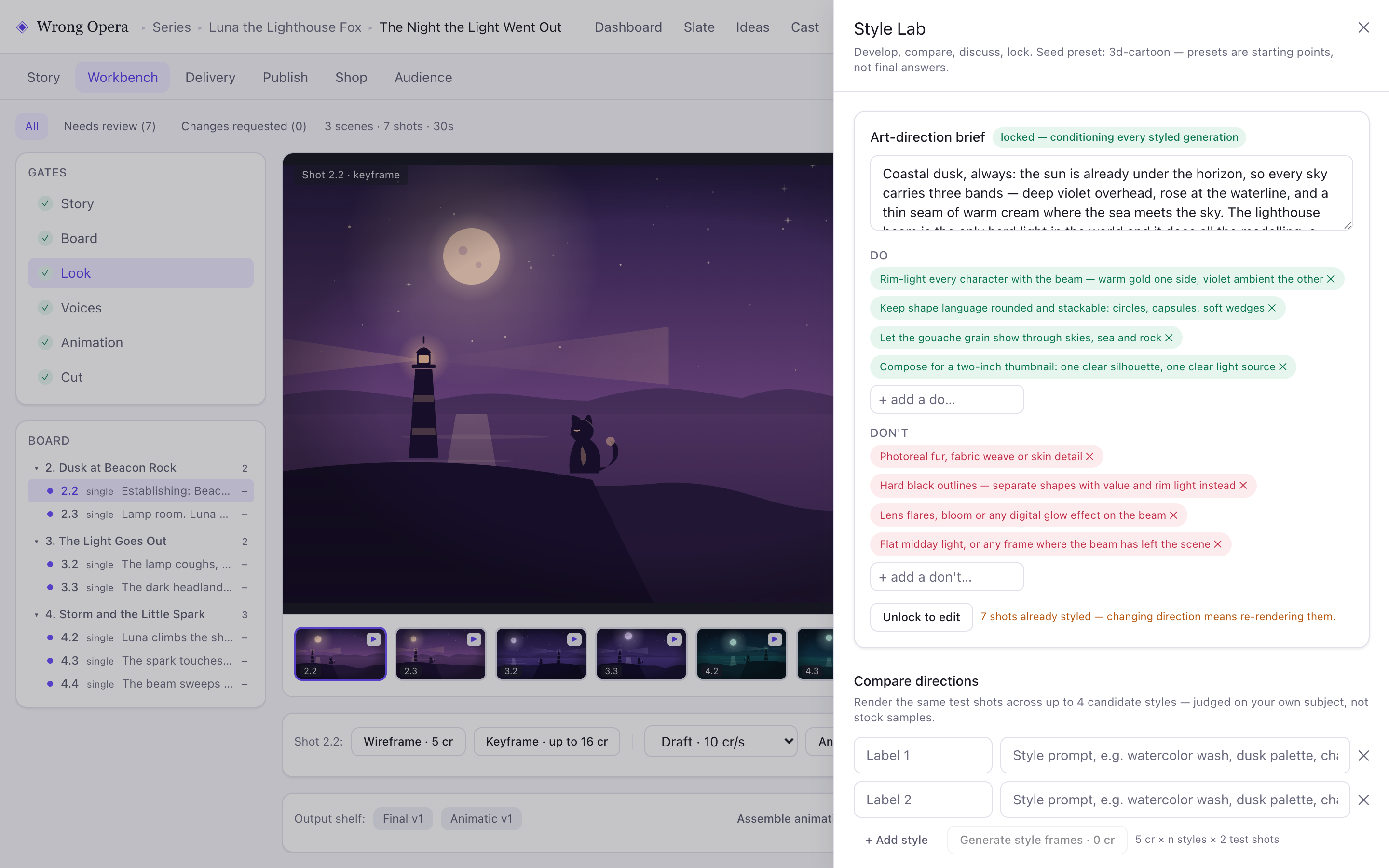
Wrong Opera’s Style Lab exposes the art-direction brief, Do and Don’t rules and a lock state. These visible decisions can form the acceptance criteria for a shot generated in either workflow.
Real product interface captured 7 September 2026; fictional built-in project and approval data. Animation and final-cut playback in these captures use still-image fixture clips, not provider-generated animation or evidence of a completed production.
Open full-size product screen ↗Make the competing requirements explicit
Select the requirements that affect your next deliverable. Avoid awarding points for a capability that your production will never use.
| Need | Evaluate | What would prove fit |
|---|---|---|
| Explore model-based visual variations | Adobe Firefly | Accepted variations from the same approved brief |
| Develop a story and recurring cast together | Wrong Opera | A coherent scene after a character revision |
| Refine and assemble generated clips | Both | A working cut with the required audio and timing |
| Keep client decisions near production | Both against your review brief | A reviewer can identify and approve the latest change |
Documented capabilities, access and usage units
Checked on 23 September 2026. “Documented” means the provider publicly describes the capability; it is not a hands-on performance result. “Confirm” identifies a requirement this review has not established. An undocumented feature is not assumed to be absent.
| Requirement | Wrong Opera | Adobe Firefly |
|---|---|---|
| Production workflow | Documented: Story, Board, Look, Voices, Animation and Cut, with reusable cast references and simulated story feedback. | Documented: generate and edit video, with Firefly and partner-model options and connections to Adobe creative applications. |
| Access | Reviewed applications. The published 14-day trial includes 800 credits; trial downloads, YouTube publishing and storefront features are restricted. | Documented: limited free use and paid subscriptions. Available models, bundled apps and enterprise provisions depend on the chosen plan. |
| Cost unit | Published Studio offer: £499 one-time with 45,000 credits. Credits are consumed by actions, not a guaranteed amount of finished runtime; agree team scope separately. | Monthly generative credits cover premium operations; standard and premium features have different allowances. Confirm the exact model and operation in your estimate. |
| Final handoff | Confirm required export container, codec, resolution, separate audio and editable project handoffs before approval. | Confirm the same delivery specification in the intended plan; a video-download option alone does not establish every required export. |
| Production evidence | Available evidence here: real interface captures with fictional sample data. Accepted output quality, retry cost and completion time are unmeasured. | Provider documentation supports feature availability. This article does not independently establish output quality, retry cost or completion time. |
Test a visual change that affects the edit
Use an original three-shot scene about a gardener finding a tiny doorway inside a fallen tree. Supply a character sheet and a visual reference that you control. Ask for a wide discovery, a close view of the doorway and a reaction. The doorway must remain on the same side of the trunk throughout.
After the first review, request a change from midday to dusk. Record how lighting changes alter character readability, scene continuity and the cut. Separate creative review time from generation time, and log discarded attempts. This bounded exercise tests a production problem rather than rewarding whichever product produces the most striking first still.
Choose on accepted work and verified requirements
Firefly may be a better starting point when your team wants its documented multi-model exploration and video-editing environment. Wrong Opera may be a better starting point when the main problem is organising narrative development and creative approvals. These are reasoned fit assessments, not hands-on benchmark findings.
Judge the final sequence against the same brief: recognisable character, stable doorway placement, legible discovery and deliberate pacing. Discuss current model availability, access and delivery requirements directly. Adobe distinguishes its own model from partner models in its published usage information; do not assume one model’s conditions apply across every option in a workspace.
Evaluate Firefly first when generation needs to fit an existing Adobe finishing process. Evaluate Wrong Opera when the unresolved problem is developing the narrative and carrying approvals through production. Confirm the actual exported asset and import step before treating the tools as interchangeable.
Questions & answers
Is Firefly limited to Adobe’s own video model?
No. The official video page documents Adobe and partner models in the Firefly workspace. Check current availability for your account and intended workflow.
Does this establish a quality winner?
No. The comparison identifies evaluation tasks and documented workflow differences. Use your own controlled brief to assess accepted output and revision effort.
Sources & further reading
References for this article, checked for publication on 23 September 2026. Product details can change; confirm the requirements for your project with the provider.
Evaluate the workflow with your production team.