
An AI production workbench should be evaluated against the work your team actually needs to finish. Wrong Opera connects writing, simulated audience testing, storyboarding, character and voice casting, animation, editing and publishing across several formats. A useful evaluation follows one representative project through the relevant stages and records both the creative result and the effort required to achieve it.
1. Select a pilot that exposes real production needs
Choose a contained example of recurring work: a lighthouse keeper hands an apprentice a red notebook as their floating island docks. The scene combines familiar characters, a prop interaction, dialogue and a location change. Bring references and material your team is authorised to use.
Avoid selecting only the easiest shot or attempting an entire season. The pilot should reveal the decisions and revision patterns your team encounters often.
2. Record the existing workflow and baseline
List who writes, reviews, boards, casts, produces, edits and approves comparable work. Note the handovers, repeated corrections and waiting time. Where you have reliable records, establish the current effort and costs for the same scope.
Separate active production time from queue time and external dependencies. Otherwise a faster demonstration can look like an improvement without addressing the delays your team actually experiences.
3. Agree what a usable result must demonstrate
Set observable creative criteria before the demonstration: recognisable characters, understandable staging, approved dialogue, coherent sound and an edit the team can review meaningfully. Include representative corrections rather than judging only first-pass output.
For the two-character scene, request a changed line, a revised reaction and a prop continuity correction. Observe the work involved and whether each revision affects material you had already accepted.
- Name the person who can accept the creative result.
- Choose revisions that happen in ordinary production.
- Record manual work needed to reach the agreed standard.
4. Confirm operational and commercial requirements
Bring specific questions about available outputs, review workflows, account arrangements, integrations, support and pricing. Ask how your intended use of scripts, characters, voices and generated material is addressed in the applicable terms.
Provide your organisation's security and procurement requirements for a concrete response. Do not infer export compatibility, intellectual property guarantees, SSO or certifications from a general product demonstration.
5. Follow the project through the relevant stages
Keep a record of decisions, outputs, revisions and unresolved issues as the pilot moves through development and production. Involve the people who would use or review each stage, including editorial and post-production colleagues where relevant.
If simulated audience testing is included, assess whether it helps your team investigate story questions. Keep that judgement separate from claims about real audience demand or expected commercial success.
Inspect a review decision at shot level. In the captured Wrong Opera Board view, a shot has Approve and Request changes controls while the gate has its own approval state and Reopen gate action. Ask the demonstrator to show which decision changes the next production step, then repeat the same review with your own bounded brief. A green status in seeded sample data is not evidence of a successful pilot.
Run one deliberate late change, such as a prop correction that must appear in two shots. Record which references were changed, which outputs were reused, which attempts were rejected and how long review took. Keep elapsed waiting time separate from active operator time. Verify the required export in the intended receiving application before calling the handoff complete.
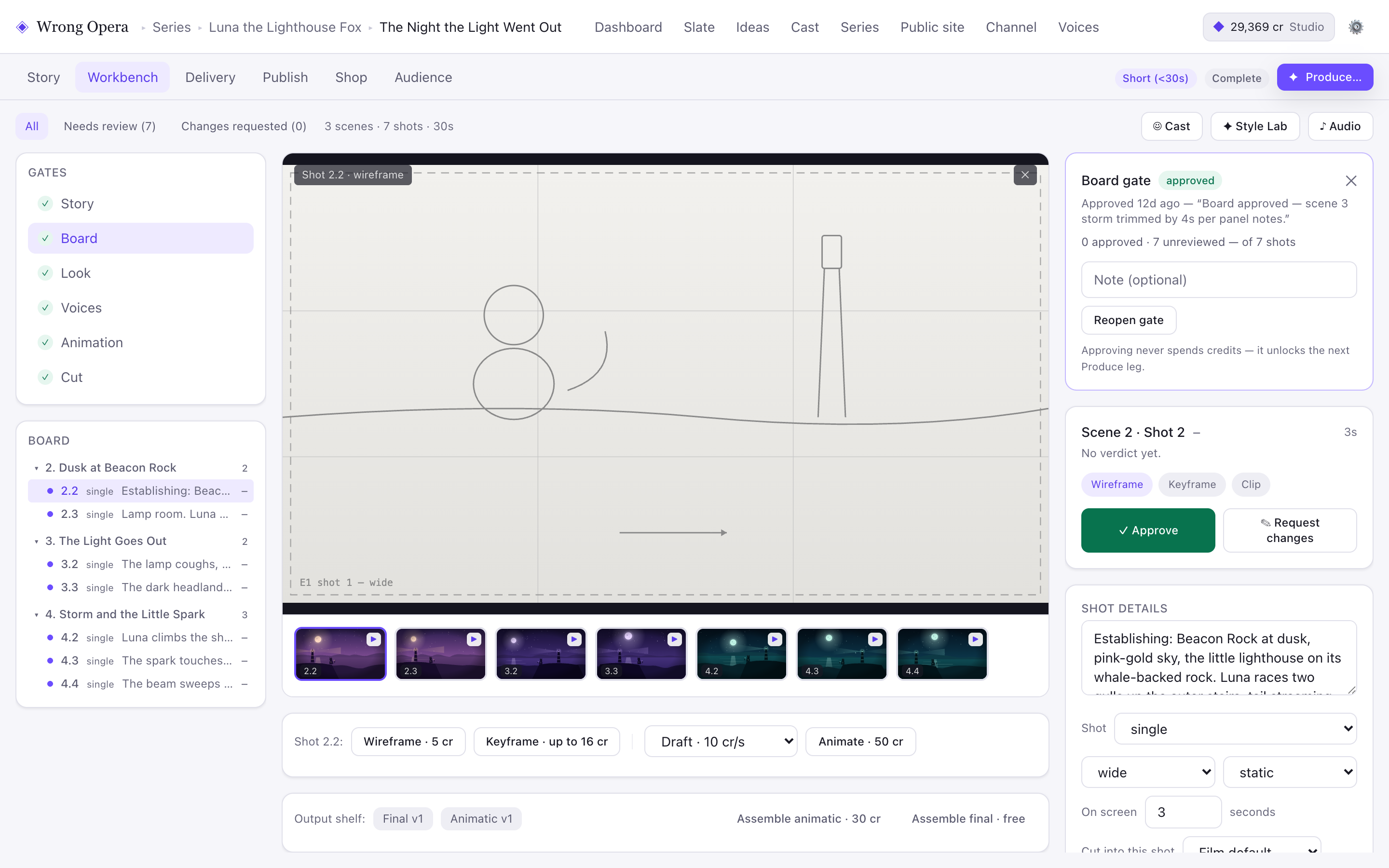
Use the visible distinction between a shot verdict and a gate approval as an evaluation question. The screenshot demonstrates available interface controls, not the outcome of a team pilot.
Real product interface captured 7 September 2026, using fictional built-in demo data. Approval notes and balances are sample data. Any animation or final-cut video slot shown holds a still placeholder frame.
Open full-size product screen6. Compare the evidence and define a bounded next step
Review creative quality, total effort, revision handling and the operational requirements together. Identify which workflows the evidence supports, which need another test and which remain unsuitable for your current requirements.
If you proceed, choose a defined next production with named owners and review points. Keep expectations tied to what the pilot demonstrated; one successful scene does not establish performance across every format or production volume.
- Keep a link to each accepted output and the receiving application used to inspect it.
- Record rejected attempts, credits, active work time and elapsed waiting time separately.
- Mark unmet export, rights or data-handling requirements as unresolved; do not average them away in a score.
- Agree a bounded next step, owner and spending limit from the observed evidence.
Questions & answers
What should we bring to a demo?
Bring a representative brief, approved references, a sample script, typical revision requests and your operational requirements. Explain who will create, review and accept the work so the conversation can follow your actual workflow.
Who should participate in the evaluation?
Include a creative decision-maker and people familiar with production and post-production. Involve security, procurement or legal colleagues when their requirements determine whether a pilot can progress.
How should we assess time or cost savings?
Compare equivalent scope and acceptance criteria, including preparation, manual fixes, review and revisions. Keep measured pilot results separate from estimates about larger productions, and document assumptions behind any forecast.
Ready to put the idea to work?