Anchor the note to a shared version
Include the project version, scene or shot identifier and the relevant time reference. “The opening feels wrong” leaves the editor to guess which opening you watched. “Cut 03, scene 02, after the door closes” gives the team a stable point of discussion even if later timing changes.
Describe what you observed before interpreting it. “I did not notice the envelope before the character hid it” provides evidence about attention. “The envelope shot is bad” labels the work without explaining the viewing problem.
Explain the effect the story needs
State what the audience should understand or feel at that point. You might want them to suspect a secret before the other character does, recognise a change in power or understand why someone leaves. This gives the person making the revision room to solve the actual problem.
When you propose a specific fix, label it as a proposal. Enlarging a prop may help, but a change in timing or eyeline could work better. Avoid turning an untested visual preference into a mandatory instruction unless that decision has genuinely been made.
Separate blockers from refinements
Group notes by their effect on acceptance. A factual mistake or missing story beat may prevent approval. A preferred transition or minor texture change may be optional. Naming the distinction helps the team protect the important work when time is limited.
This fictional review note captures a problem, an intended effect and a possible experiment without confusing them.
| Field | Example |
|---|---|
| Location | Cut 03, scene 02, envelope on desk. |
| Observation | The envelope is hidden before I register it. |
| Intended effect | Viewers should suspect the character is concealing a message. |
| Proposed test | Try a clearer glance and a slightly longer detail shot. |
| Acceptance | A fresh viewer notices the concealment without explanation. |
Review the changed section and its neighbours
After a revision, check the original problem and any new effect created by the change. A longer detail shot may clarify the envelope while making the dialogue pause feel unnatural. Review enough context to catch that tradeoff.
Mark each note as resolved, deferred or still open, with a short reason. Consolidate contradictory requests through the decision owner before sending another round. A clean revision history should show what was requested, what changed and what still needs a decision, rather than simply accumulating comments.
Wrong Opera’s Board screenshot distinguishes the selected shot’s Approve and Request changes actions from the gate’s approval state. Write the revision against the exact shot and representation under review: a wireframe layout correction is different from a keyframe colour correction or a clip timing change. The Needs review and Changes requested filters help identify the review state you should inspect.
After revising, watch the previous and next shots together and record whether the intended change is visible. If the note changes a shared character reference or locked art direction, list every affected shot before closing it. A resolved comment without a reviewed result is not sufficient evidence that the problem is fixed.
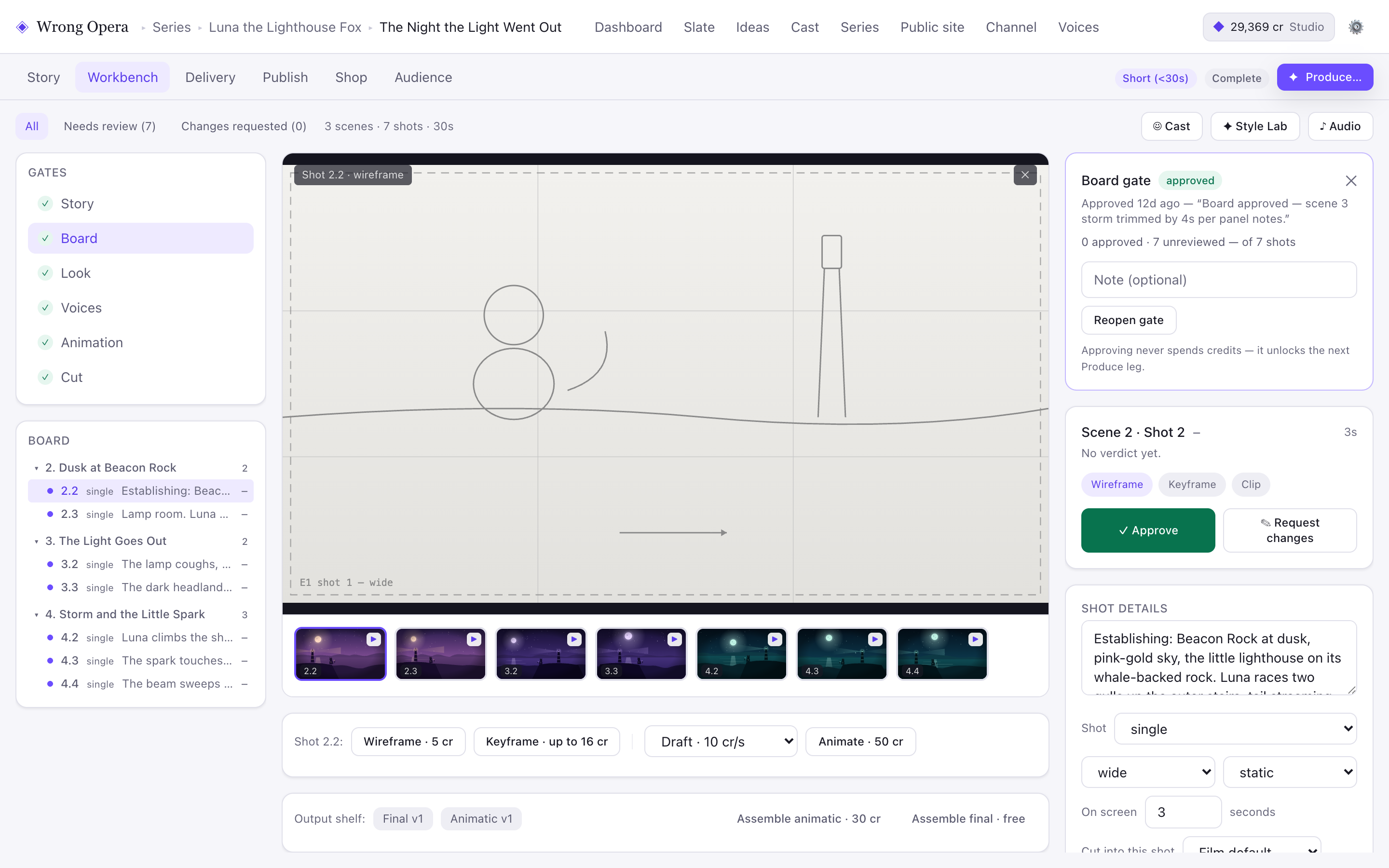
Shot-level actions and gate state appear separately. Use that distinction to keep a specific correction from becoming an ambiguous approval of the whole sequence.
Real product interface captured 7 September 2026, using fictional built-in demo data. Approval notes and balances are sample data. Any animation or final-cut playback shown uses still-image fixtures, not a measured production result.
Open full-size product screen ↗Questions & answers
Should I include positive feedback?
Yes, when it identifies something that must be preserved. “Keep the hesitation before the confession” is useful protection against a revision that fixes one issue while removing a successful beat.
What if reviewers disagree?
Ask which audience effect each person is prioritising, then have the decision owner choose. Sending incompatible instructions directly to the editor turns an unresolved creative choice into repeated rework.
Evaluate the workflow with your production team.