WRONG OPERA / FILM STUDIO
AI filmmaking software, from script to reviewed cut.
Wrong Opera connects film development, storyboards, casting, AI shot production and creative review in one workspace. Production teams and independent filmmakers can develop a scene, short or proof of concept from a logline, treatment or script, with explicit decisions at Story, Board, Look, Voices, Animation and Cut.
Create your account and verify your email. 14 days, 800 credits, no credit card.
Would you rather have a scene made for you? See fixed-price pitch scenes

INSIDE THE PRODUCT
Review the shot before the production pass.
The Board workspace shows a shot plan, a selected shot and review controls. Use a representative scene to evaluate framing, coverage and the revision process before expanding the production.
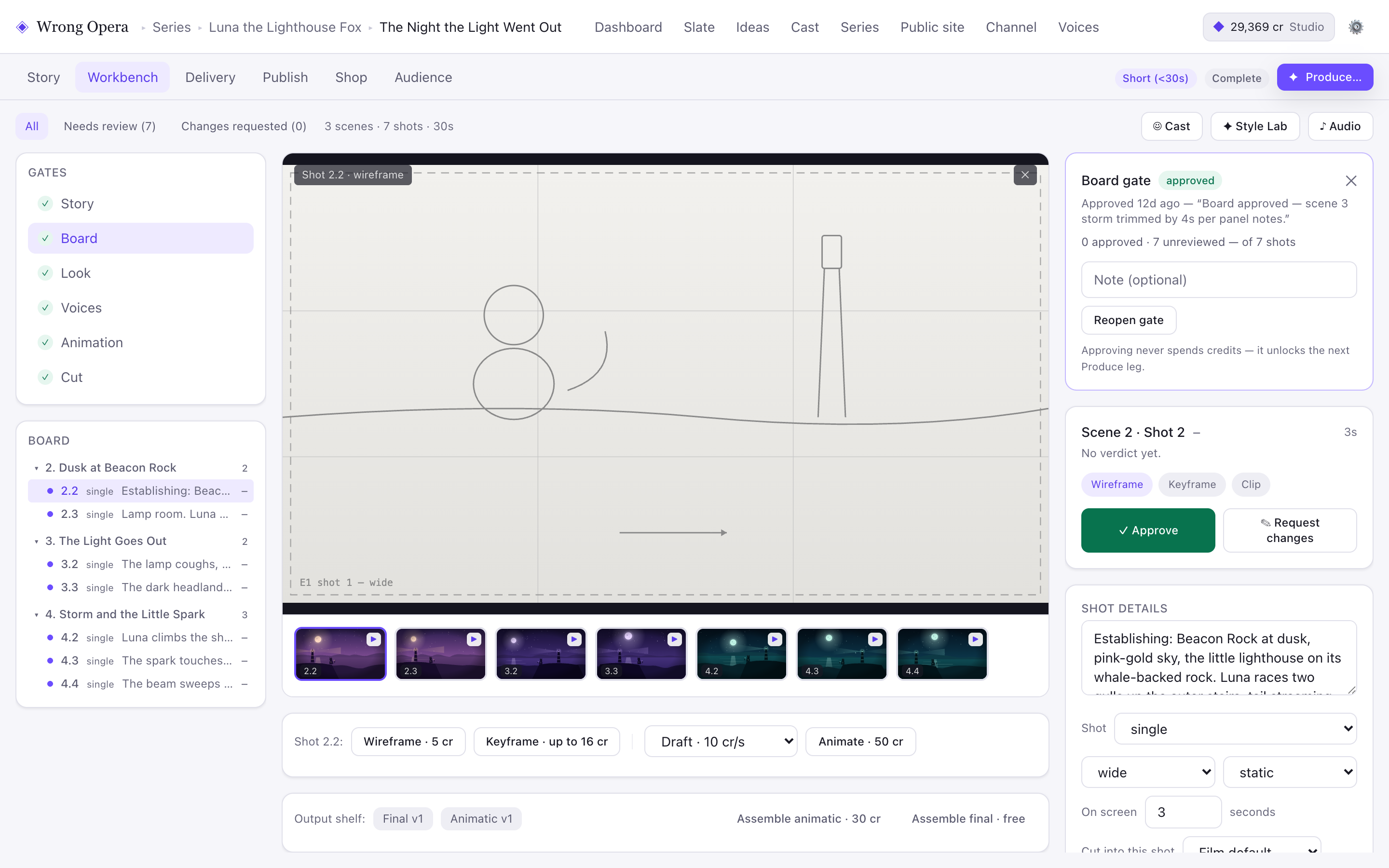
Sample project, captured on 7 September 2026. Read the screenshot notes and product facts.
FROM WHAT IF TO FINAL CUT.
From idea to something real.
Find the film inside your idea
Start with a logline, treatment or draft script. Establish the central character, the conflict and what changes by the final scene.
Plan the images before the render
Build a storyboard and shot plan. Review framing and coverage, cast characters and voices, and agree the visual direction. Simulated audience feedback can suggest questions to investigate; it does not validate audience demand.
Make the cut yours
Review takes, request changes and assess the sequence at the Cut gate. Track rejected takes, credits and any external finishing during a pilot. Confirm required output formats and delivery terms before relying on them for a commission.
MAKE AN INFORMED CHOICE
Choose a workflow, then prove it on one scene.
Use a small evaluation to establish creative quality, revision effort and delivery requirements. Start with the facts and record what your own production demonstrates.
Evaluate with your production team
Define a pilot, review responsibilities and acceptance criteria for a studio demo.
Compare the Runway workflow
Understand the distinction between generation tools and a connected narrative production process.
Compare LTX Studio
Review a sourced comparison of story, visual planning and production workflows.
Download a shot-list template
Make the choices and review criteria explicit before spending credits on production.
Plan credits and revision work
Budget for options and rejected takes instead of assuming a fixed credit cost per finished minute.
Check product and delivery facts
Confirm access restrictions, the delivery path and any requirements that need a direct answer.
Make your first move.
Explore the guidesFILM / HOW-TOHow to turn an idea into an AI film
Take a film idea through a logline, script, storyboard, casting and edit with practical checks at each creative decision.
PLATFORM / HOW-TOHow to test a story before rendering it
Use simulated audience feedback to investigate story questions, compare revisions and decide what deserves a closer human review.
Find a brief that fits.
Explore use casesBuild a short-film proof of concept
Choose a representative sequence that demonstrates a film's central dramatic and visual idea before expanding production.
Use casePrevisualise a scene from a screenplay
Turn a script excerpt into a shot plan that tests geography, coverage and the audience's understanding of a dramatic turn.
Use casePlan an original narrative music video
Build a visual story around an authorised track with a beat map, recurring motifs and a deliberate ending.
FILM STUDIO / FAQ
Before you begin.
Can I start with an existing screenplay?
Yes. Bring your written story into development and break it into scenes and shots. A clear treatment or screenplay gives the later production stages a stronger starting point.
How is this different from a video generator?
Wrong Opera connects story development, simulated testing, boards, casting, production, editing and publishing. A generated clip is one part of the wider production workflow.
Can I revise individual shots?
The workbench supports shot selection, previews and requests for changes through its creative approval gates. Review a specific shot in the context of the scene and the wider cut.
Does AI make the creative decisions?
You guide the premise, cast, visual style and revisions. The workbench gives you approval points at Story, Board, Look, Voices, Animation and Cut.
THAT IDEA YOU KEEP THINKING ABOUT?
Make something only you could.
Create your account, verify your email, then start with 14 days and 800 credits. No credit card required.