Give reviewers enough context to judge the work
State the intended audience, the purpose of the piece and the scope of this review. A first storyboard review asks different questions from a final delivery review. Explain the distinction before people spend time commenting on details that are deliberately unfinished.
For a fictional charity explainer, a board review might focus on whether the opening makes the problem understandable and whether the final action is clear. It does not yet need a debate about the final music. Keep the brief short enough that reviewers will actually use it.
Make the version and its limitations unambiguous
Use a stable version identifier and a clear label for the material being reviewed. List temporary images, provisional dialogue and sections still missing. A reviewer should not have to infer whether an unfinished frame is an error or a placeholder.
If several files form the review, explain their relationship. The storyboard, rough audio and script may each have separate versions. State which combination represents the current proposal and remove obsolete links from the handoff message so reviewers do not divide their attention across incompatible drafts.
Before opening a client round, rehearse one internal note. In Wrong Opera’s Board view, select a shot, identify whether the wireframe, keyframe or clip is being reviewed, and inspect its Approve and Request changes controls. Confirm that the person receiving the note understands which version needs another decision.
The screenshot below shows internal workbench review, not a client-facing review room. For an external review, confirm the recipient’s actual access and viewing experience during the team demo. Test with a colleague before sharing a client brief, and write down how a decision from that review will be carried back to the production owner.
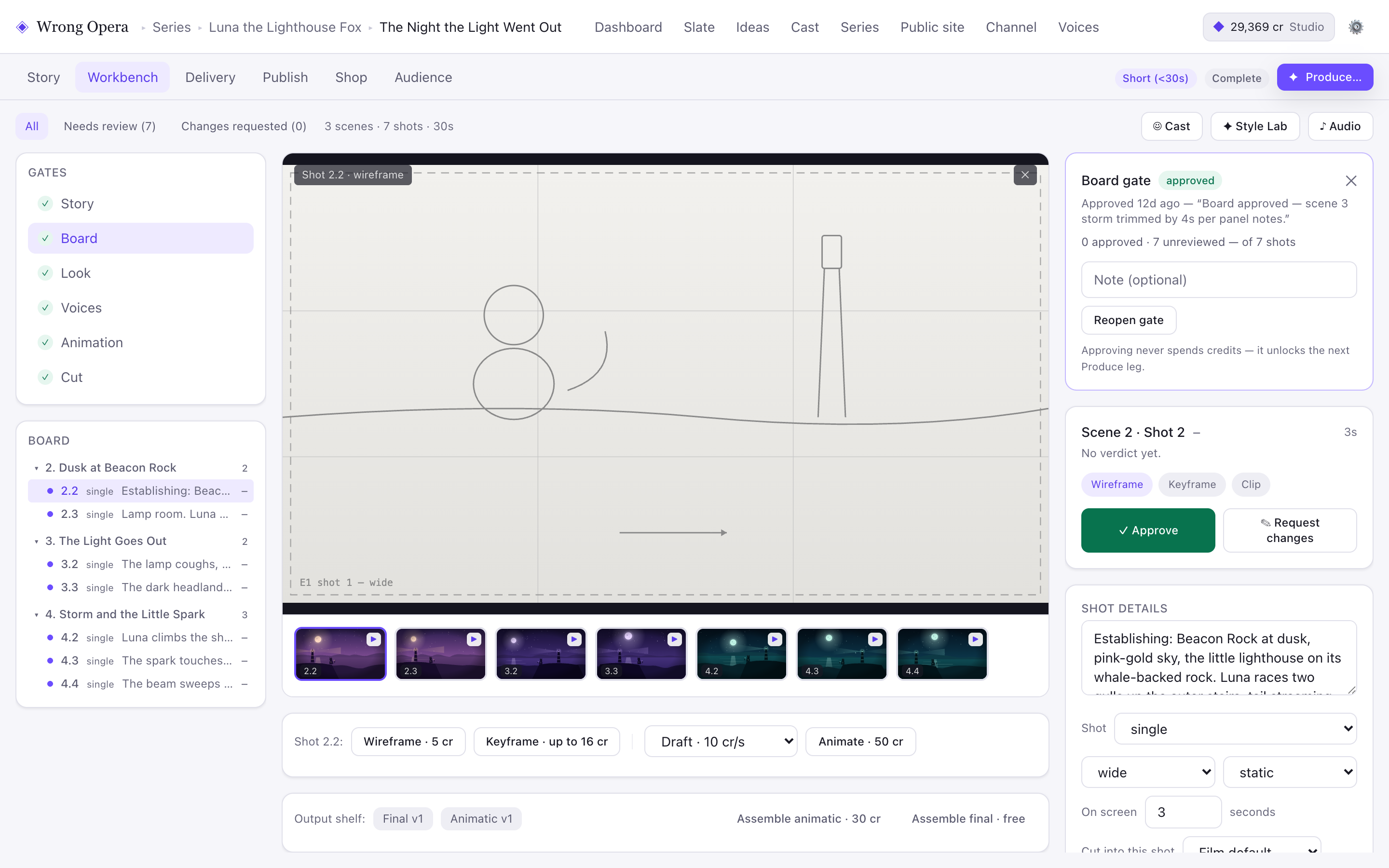
The internal Board review controls provide a concrete rehearsal before a client handoff. No client-review screen or external access permission is demonstrated here.
Real product interface captured 7 September 2026, using fictional built-in demo data. Approval notes and balances are sample data. Any animation or final-cut playback shown uses still-image fixtures, not a measured production result.
Open full-size product screen ↗Ask a small number of decision questions
Frame questions around the next production step. “Can we approve this story order?” leads to a decision; “Any thoughts?” can produce an unlimited new brief. Include a way to flag a serious issue outside the requested scope, while keeping ordinary preferences separate.
The following fictional handoff checklist gives the review a concrete purpose and a defined response format.
| Include | Example |
|---|---|
| Version | Explainer boards 04 with script 06. |
| Decision | Approve the story order before detailed artwork. |
| Known limitations | Temporary voice read; colour direction not final. |
| Feedback format | Scene ID, observation, intended effect, priority. |
| Decision owner | Named project lead consolidates the review. |
Close the review with decisions, not just comments
Collect responses in one place and resolve contradictions before assigning revisions. Record approved elements, required changes and open questions. Where a reviewer asks for a substantial scope change, make that decision explicit rather than blending it into routine polish.
Return a concise decision record with the next version’s purpose. When revised material is ready, identify which notes it addresses. This makes the review history useful to someone joining the project later and reduces the chance of an already resolved issue being reopened without new evidence.
REVIEW HANDOFF
Project / episode: [name]
Version and location: [link or file]
Stage under review: [story / board / look / voices / animation / cut]
Known unfinished elements: [list]
Decision required: [specific question]
Reviewer and deadline: [name / date]
Decision owner: [name]
Accepted / change requested: [decision]
Next version and completion check: [record]
Questions & answers
What if a reviewer misses the agreed review window?
Define how late feedback will be handled before the review begins. The decision owner can judge whether a new issue warrants reopening work, rather than letting timing silently determine priority.
Should everyone approve every stage?
Choose reviewers whose decisions are needed at that stage. Keep others informed where appropriate, but distinguish consultation from final approval so responsibility remains clear.
Evaluate the workflow with your production team.