A transcript and a screenplay create different editing problems
Descript’s official video-editing page describes editing footage by changing its transcript, alongside timeline editing, audio tools, generated visuals and its Underlord co-editor. It also documents collaboration and repurposing recordings into shorter clips. It should not be treated as an audio-only editor.
Wrong Opera’s Film Studio begins with a logline, treatment or script, then connects story planning, boards, casting, production and the cut. The important distinction for your evaluation is whether the work primarily selects from recorded speech or develops a scene that has not yet been produced.
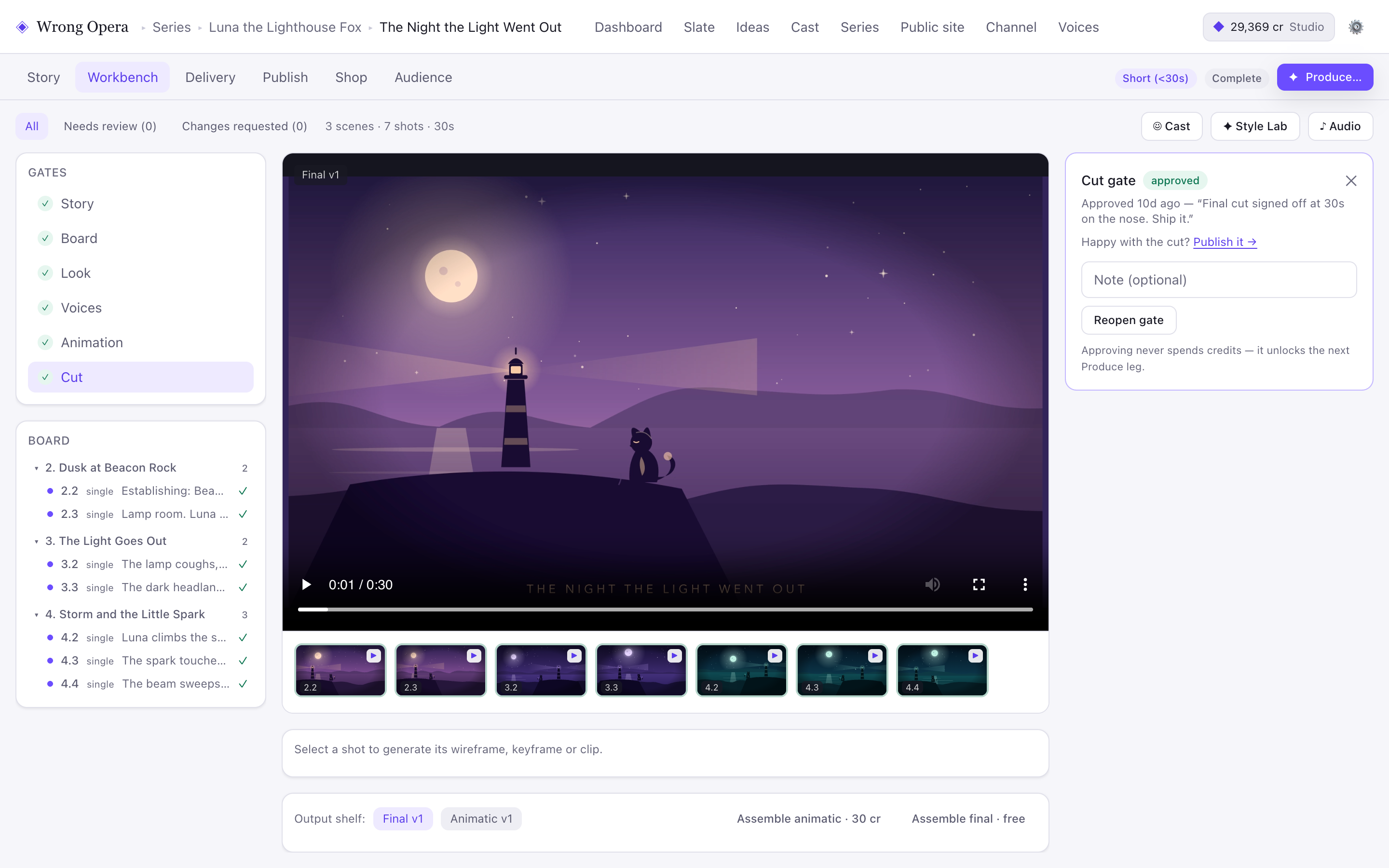
Wrong Opera’s Cut screen shows an output shelf and creative gates beside the current version. The image demonstrates the interface only; the paused sample video is a still-image fixture.
Real product interface captured 7 September 2026; fictional built-in project and approval data. Animation and final-cut playback in these captures use still-image fixture clips, not provider-generated animation or evidence of a completed production.
Open full-size product screen ↗Choose around the most frequent edit
Identify the edit you make ten times in a normal project. A workflow suited to that repeated operation can matter more than a broad list of features you rarely use.
| Typical operation | Evaluate first | Acceptance check |
|---|---|---|
| Remove a repeated explanation in an interview | Descript | Meaning and conversational rhythm survive |
| Turn an original script into staged action | Wrong Opera | Shots communicate the dramatic change |
| Make several excerpts from a recording | Descript | Each excerpt retains enough context |
| Revise a recurring character’s scene | Wrong Opera | References and approvals remain connected |
Documented capabilities, access and usage units
Checked on 23 September 2026. “Documented” means the provider publicly describes the capability; it is not a hands-on performance result. “Confirm” identifies a requirement this review has not established. An undocumented feature is not assumed to be absent.
| Requirement | Wrong Opera | Descript |
|---|---|---|
| Production workflow | Documented: Story, Board, Look, Voices, Animation and Cut, with reusable cast references and simulated story feedback. | Documented: edit recordings through text, use timeline tools and apply AI editing and media-generation features. |
| Access | Reviewed applications. The published 14-day trial includes 800 credits; trial downloads, YouTube publishing and storefront features are restricted. | Documented: free entry tier and paid per-person plans. Export resolution, watermark removal and team capacity depend on the plan. |
| Cost unit | Published Studio offer: £499 one-time with 45,000 credits. Credits are consumed by actions, not a guaranteed amount of finished runtime; agree team scope separately. | Media hours measure uploaded or recorded material; AI credits measure AI feature use. Those are different units and neither measures accepted finished runtime. |
| Final handoff | Confirm required export container, codec, resolution, separate audio and editable project handoffs before approval. | Confirm the same delivery specification in the intended plan; a video-download option alone does not establish every required export. |
| Production evidence | Available evidence here: real interface captures with fictional sample data. Accepted output quality, retry cost and completion time are unmeasured. | Provider documentation supports feature availability. This article does not independently establish output quality, retry cost or completion time. |
Prepare a paired recording and fictional scene
Record a short explanation of how a fictional repair café works, using material you have permission to use. Mark a repeated sentence, a long pause and a useful twenty-second excerpt. In the recording-focused evaluation, ask for those three edits and check whether the transitions still sound natural.
For the narrative evaluation, use a three-shot scene: a visitor arrives with a broken lamp, meets a volunteer and sees the lamp light up. Add a late request to change the volunteer’s reaction from surprise to quiet satisfaction. Record the actions needed to revise the performance and approve the new cut. The two tasks show which workload better resembles your regular production.
Use editorial meaning as the acceptance standard
Descript may be the more natural fit for a team whose work is dominated by interviews, tutorials or speech-led recordings. Wrong Opera may be more relevant to a team building original fictional scenes and recurring casts. These are workflow hypotheses to validate, not measured productivity claims.
Listen to edited speech without watching the picture, then watch with the sound muted. The first pass exposes meaning changes and awkward cadence; the second reveals unexplained visual jumps. For narrative scenes, also check whether the reaction arrives after its cause. Confirm import and delivery requirements with each provider before planning a handoff between products.
Choose an existing interview or recording when testing Descript, and a scripted scene when testing Wrong Opera. If your work combines both, price the handoff as well: preparing assets, preserving dialogue meaning, importing exports and making the final revision.
Questions & answers
Can Descript generate material as well as edit recordings?
Yes. The official product page describes generated scripts, visuals and voiceovers alongside recorded-media editing. This comparison focuses on workflow fit.
Can both tools be used in one production?
Potentially, but verify the specific media handoff, permissions and delivery requirements. This article does not claim a native integration.
Sources & further reading
References for this article, checked for publication on 23 September 2026. Product details can change; confirm the requirements for your project with the provider.
Evaluate the workflow with your production team.